
New Pipedrive Stripe Integration: Save time and gain 100% insight
A customer calls about their invoice. Your rep opens the deal in Pipedrive, then opens a second tab for Stripe. Searches by email. Finds two similar names. Isn’t sure which Stripe account this customer is even in. Ninety seconds later they have an answer they’re not fully confident in.
Now the harder version of the same problem: a subscription quietly failed to renew last Tuesday. Nothing in Pipedrive changed. No activity was created, no deal moved, nobody was notified. Your CRM still shows a happy customer.
The gap between Pipedrive and Stripe isn’t really a visibility problem. It’s that your billing reality can’t trigger anything in your CRM.
We built a Pipedrive Stripe integration that fixes both halves, and we’re looking for companies to test it.
Why Pipedrive and Stripe don’t talk
Pipedrive is built around the pipeline: stages, activities, deal value, forecast. Stripe is built around billing: subscriptions, invoices, payment status, revenue. Both are excellent at their job. Neither answers the question your team asks a dozen times a day: what is this customer actually paying us, and is it going through?
The usual workarounds each cost something:
- Manual custom fields. Stale within a week, and nobody trusts them.
- Zapier-style syncing. Copies billing data into your CRM, where it drifts out of date.
- Just open Stripe. The default, and the reason your reps context-switch all day.
See it in two minutes
- The Stripe Billing panel opening inside a Pipedrive deal, with live subscriptions, invoices and payment status
- Subscription status written into native Pipedrive deal fields, and a Pipedrive automation firing off a cancellation
- The customer list and MRR analytics across two connected Stripe accounts
Billing data where the conversation happens
The app opens as a panel on your deal and organization detail pages. No new tool to learn, no separate login.
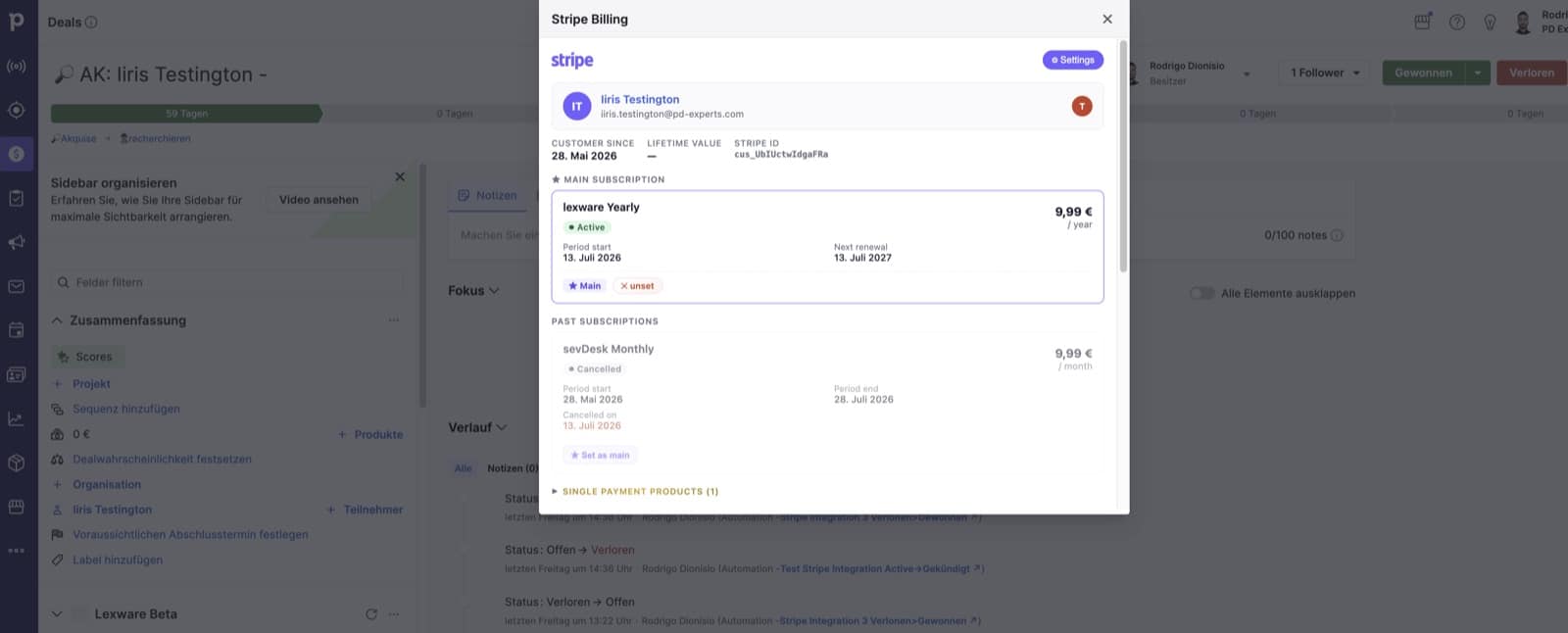
Customer since, lifetime value, the active subscription with its real billed amount and next renewal, plus past subscriptions and one-time purchases.
When a customer has several subscriptions, you mark one as the main subscription. That’s the one that drives the deal’s fields and status, so a customer with three plans doesn’t produce three conflicting answers.
A note on “real billed amount”: if you use volume or tiered pricing, most integrations show €0, because Stripe leaves the unit price empty on tiered plans. We read the actual invoiced total instead, so the figure is what your customer really pays.
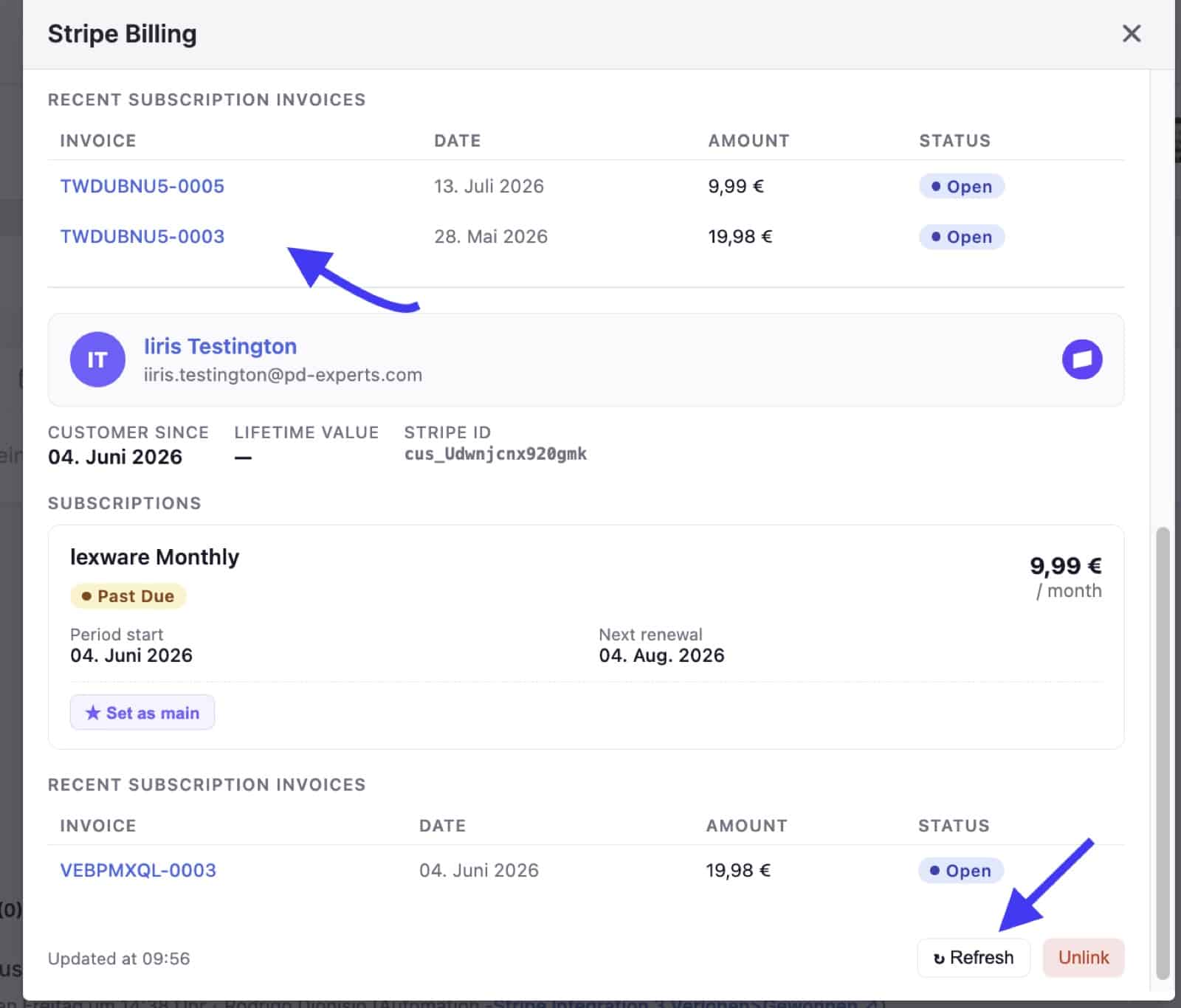
Two things the arrows point at: every invoice number is a link straight to that invoice in Stripe, and Refresh updates both the panel and the deal’s billing fields on the spot.
Every invoice number is a link. Click it and that exact invoice opens in Stripe. No searching by customer name, no working out which of three invoices the customer means. When someone on a call says “the one from May”, you’re one click from it instead of one tab and three searches. (Whoever clicks through needs their own Stripe access. The invoice list, amounts and payment statuses are visible in Pipedrive to everyone.)
Refresh does two things at once. It pulls the billing data fresh from Stripe, bypassing the short cache, and it updates this deal’s Pipedrive billing fields immediately, without waiting for the daily sync. So when a customer pays a failed invoice while you’re on the phone with them, you hit Refresh and the deal is correct before the call ends. That’s the bridge between the panel and the automation side: the fields your workflows depend on can always be brought up to date on demand, one deal at a time.
The part that actually changes your workflow: billing status as a Pipedrive field
Everything above is visibility. This is the part that makes billing operational.
Once a day, the app writes key billing information into native Pipedrive deal fields it creates for you. Four of them: Status, Cancelled on, End date and Pending since. Only deals linked to a Stripe customer are touched.
Because they’re ordinary Pipedrive fields, everything Pipedrive can already do now works on your billing data:
- Filter and segment. “All deals with a failed renewal payment”, as a saved filter.
- Automations. Move the deal, create an activity, notify the owner, send an email when status changes.
- Reports and dashboards. Churn and payment problems in native Pipedrive reporting.
- Workflows for your CS team, without anyone opening Stripe.
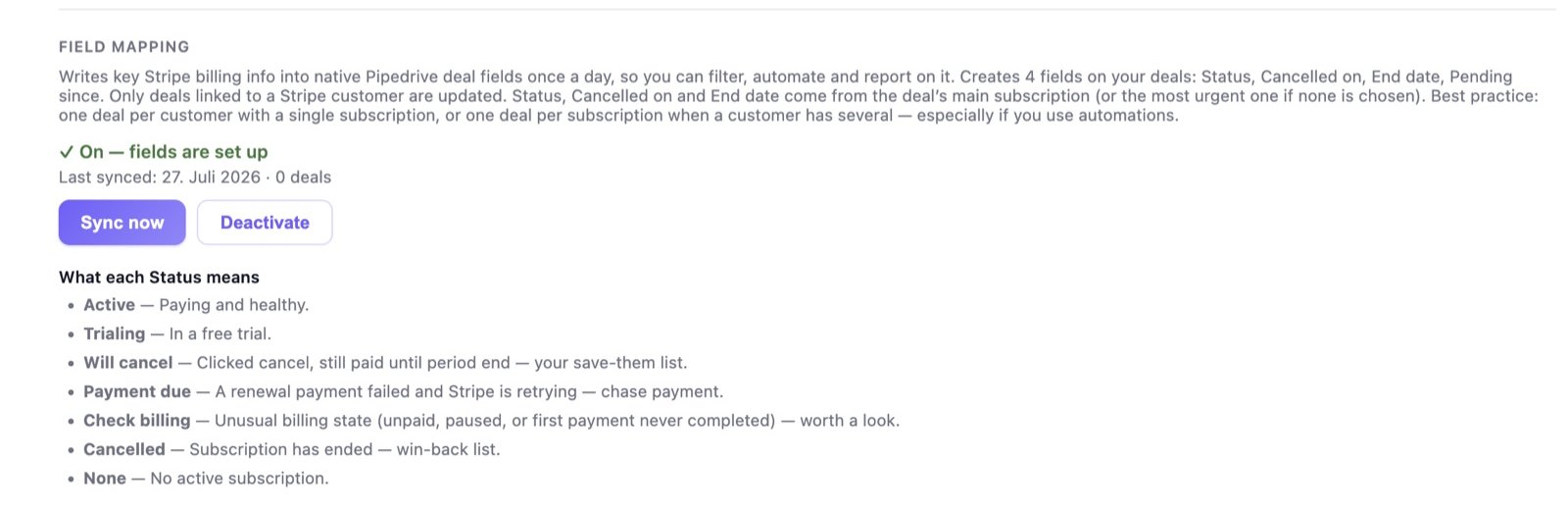
Turn it on once. Four deal fields are created and kept up to date daily, or on demand with Sync now.
The Status field uses plain language your sales team can act on rather than Stripe’s internal states:
| Status | What it means for you |
|---|---|
| Active | Paying and healthy |
| Trialing | In a free trial, your conversion list |
| Will cancel | Cancelled, still paid until period end, your save-them list |
| Payment due | A renewal payment failed and Stripe is retrying, so chase payment |
| Check billing | Unusual state (unpaid, paused, first payment never completed) |
| Cancelled | Subscription has ended, your win-back list |
| None | No active subscription |
Those aren’t just labels. Will cancel is a Pipedrive automation waiting to happen: subscription flagged for cancellation, deal moves to a retention stage, activity created for the owner, the same day it happens rather than the month after.
The sync runs once a day, and you can trigger it for a single deal at any time with the Refresh button in the panel, so a status you just changed in Stripe doesn’t have to wait until tomorrow to reach your automations. You can deactivate field mapping entirely at any time.
Find the paying customers nobody is tracking
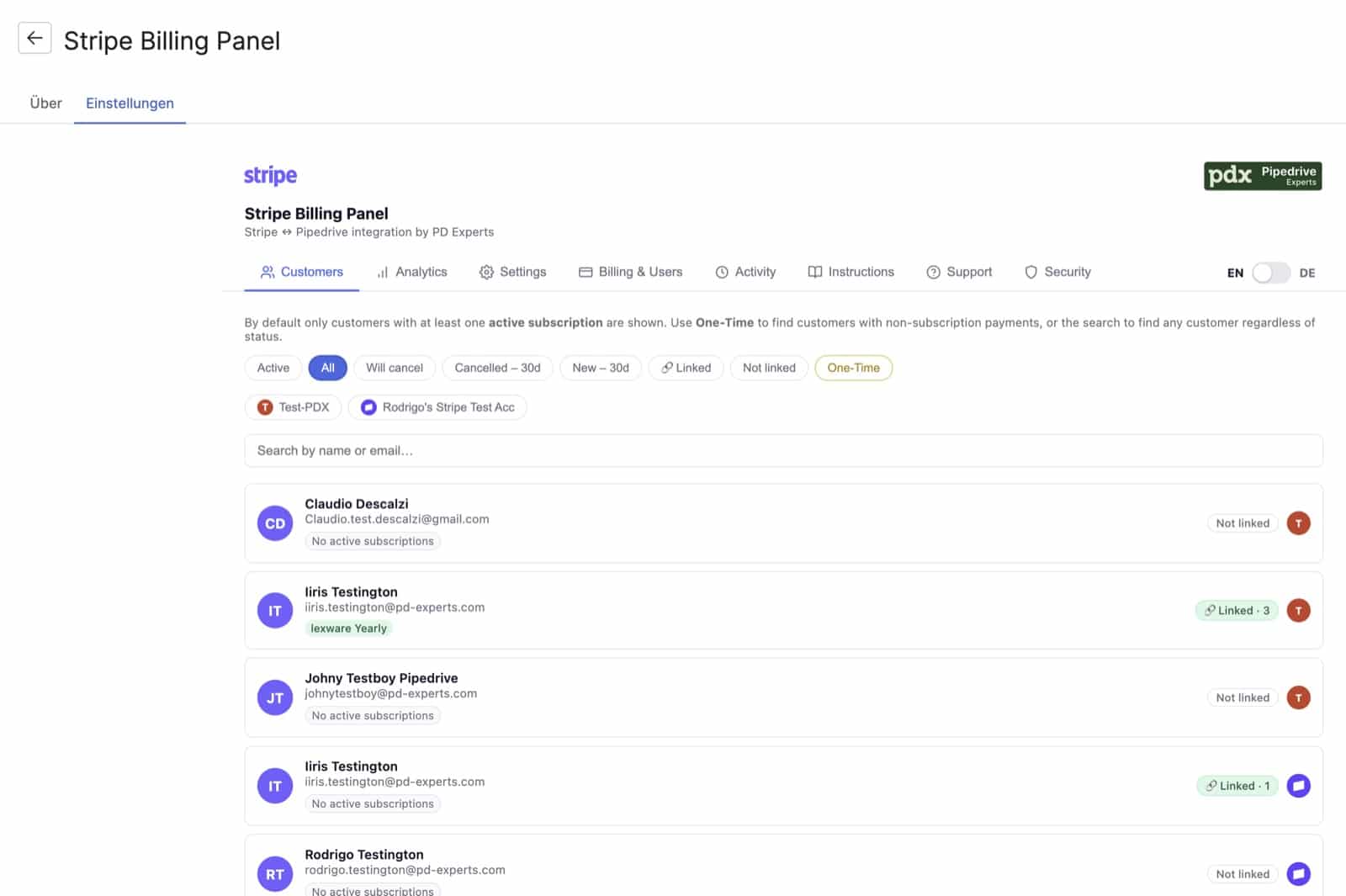
Filter by Active, Will cancel, Cancelled in the last 30 days, New in the last 30 days, One-Time, or by whether the customer is linked to a Pipedrive deal at all.
The filter people react to is Not linked: every active paying customer with no deal or organization attached in Pipedrive. Revenue that exists in Stripe and nowhere in your CRM. It’s usually a longer list than expected.
From any row you can link the customer to an existing deal, or create a new deal using Pipedrive’s own new-deal dialog, so your pipelines, owners, required fields and custom fields behave exactly as normal. The new deal is linked to the Stripe customer automatically.
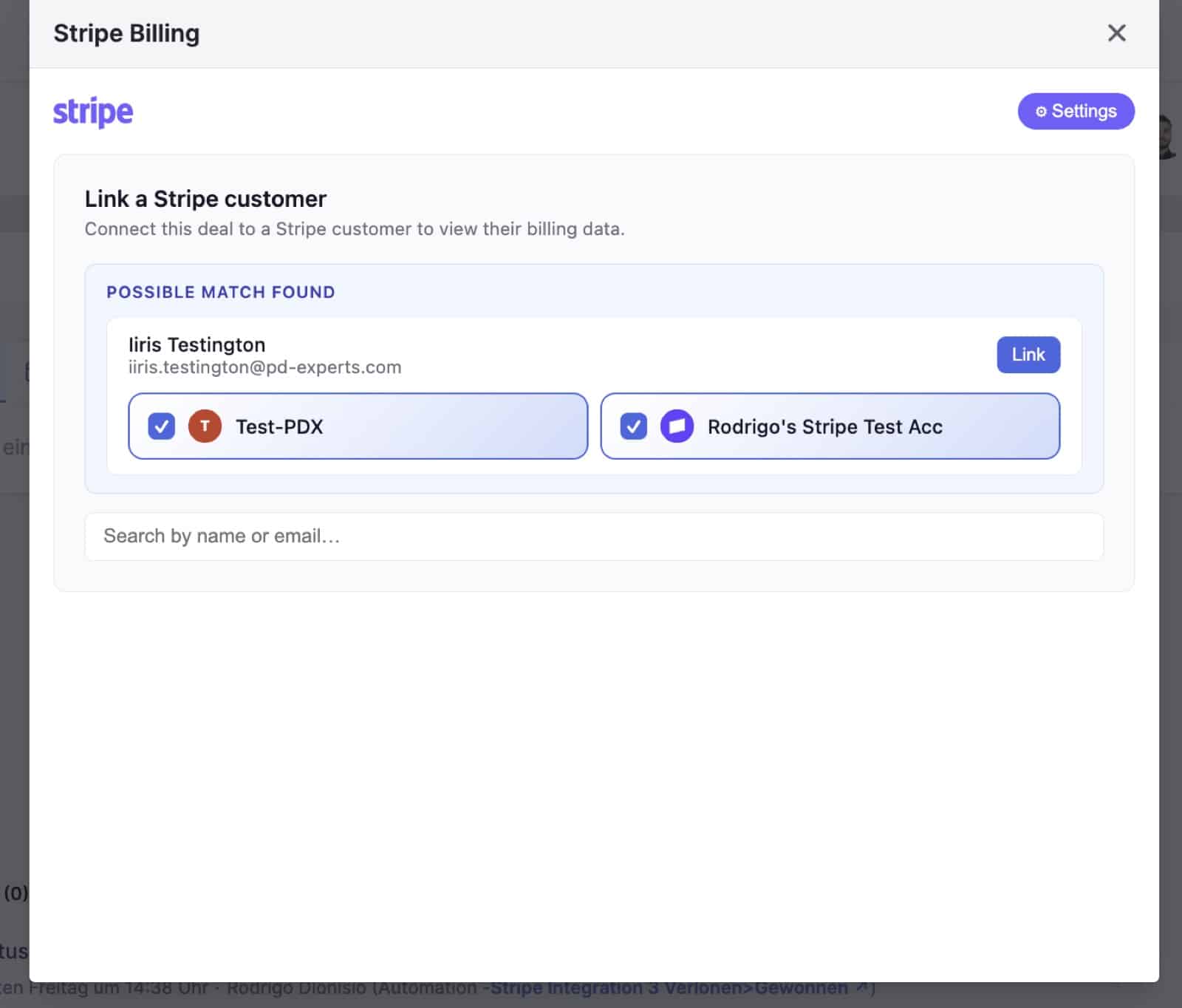
Matches are suggested automatically from the deal’s contact email and the organisation name, searched across every connected Stripe account.
MRR and churn, without an export
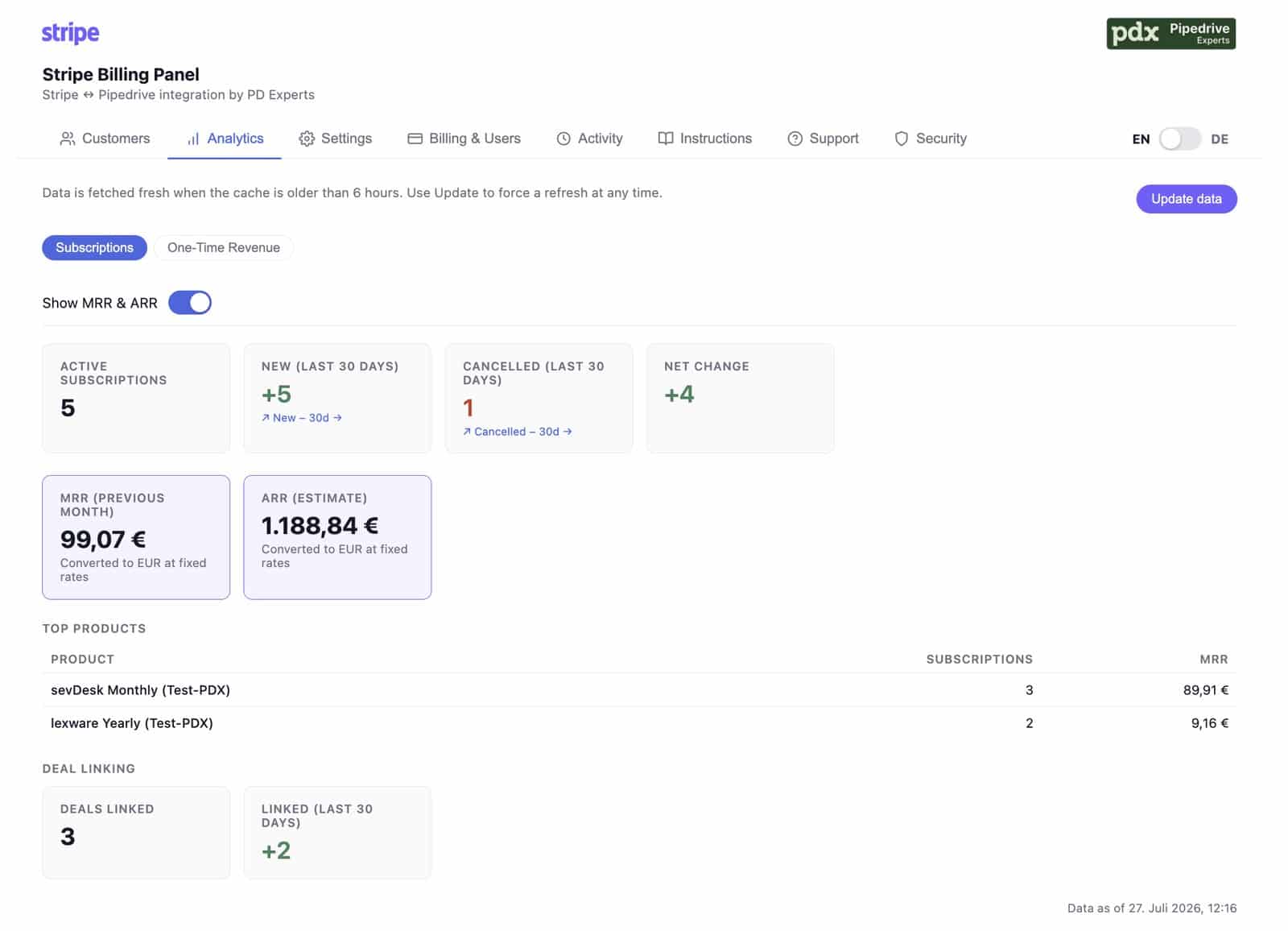
Active subscriptions, new and cancelled in the last 30 days, net change, MRR, ARR and top products, plus a separate view for one-time revenue.
MRR and ARR sit behind a toggle, so the numbers aren’t on screen for everyone by default. Multi-currency revenue is converted to EUR at fixed rates for comparison. Figures are cached and refreshed every six hours, with an Update data button when you want them live.
There’s a separate One-Time Revenue view for non-subscription sales: this-month invoice status, year-to-date paid revenue and your top one-time products. One-time purchases show on the deal panel too, so a customer who buys rather than subscribes isn’t invisible.
One Pipedrive, several Stripe accounts
If you bill through more than one Stripe account, whether that’s separate entities, separate brands, or a legacy account you never fully migrated, this is where most integrations stop.
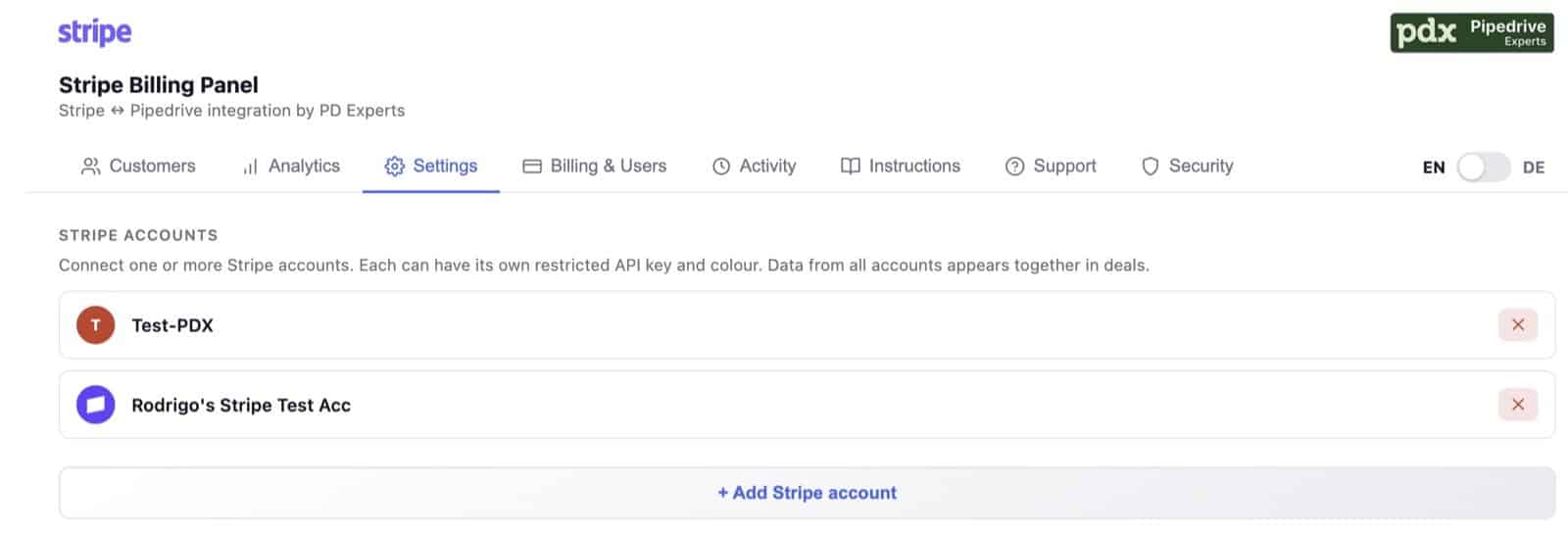
Connect several Stripe accounts, each with its own restricted key, and a colour or logo of your choice. Data from all of them appears together on the deal.
You can connect up to ten Stripe accounts. Each one gets its own badge: pick a colour, or upload that entity’s logo instead. The badge appears beside every customer and subscription, so you can see at a glance which account a payment belongs to. Customers are matched across accounts by email where there is one, and by name otherwise, so one company appears once with all of its accounts listed, instead of forcing you to pick one and hope.
Coming soon: new subscriptions create their own deals
Today you connect a Stripe customer to a deal yourself, either by accepting the suggested match or by searching. The next feature removes that step for new business entirely.
When a customer subscribes in Stripe, the app will create a Pipedrive deal automatically, in a pipeline and stage of your choosing, and link it to the Stripe customer so field mapping takes over from there. You’ll configure it per Stripe account: which products should create deals, the target pipeline and stage, a title template, the deal value taken from the subscription amount, and the deal owner.
That closes the loop. A self-serve signup in Stripe becomes a deal in the right pipeline, with billing status attached and kept current, without anyone typing anything into the CRM.
This one is on the roadmap rather than in the product today. Beta testers get it first, and the rules we build will reflect what testers ask for, which is a decent reason to join the beta now rather than after launch.
What it reads, and what it writes
Worth being precise about, since it’s your CRM and your billing data.
In Stripe, read-only, always.
The app uses a restricted Stripe key with read access only to customers, subscriptions, invoices, products and prices. It has no write permission of any kind. It cannot charge, refund, cancel, or edit anything in Stripe. You create the key yourself in your own Stripe dashboard and can revoke it any time.
In Pipedrive, it writes only what you switch on.
If you enable field mapping, the app creates and updates its four billing fields on deals linked to a Stripe customer. Nothing else on the deal is modified, and you can deactivate it. Without field mapping enabled, the app only reads.
Data handling.
Panel data is fetched from Stripe on demand rather than continuously mirrored. Analytics figures are cached for six hours for performance. Every request is scoped to your company and authenticated against Pipedrive on each call. An Activity log shows what happened in the app, and a Security tab documents the setup.
Who this Pipedrive Stripe integration is for, and who it isn’t
A good fit if you:
- Use Pipedrive, and handle your subscriptions in Stripe Billing
- Have a sales or CS team that needs payment status without asking finance
- Want renewals, failed payments and cancellations to trigger something in your CRM
- Bill through one or more Stripe accounts
Not a fit yet if:
- Your subscriptions are created and managed outside of Stripe. The app reads subscription records from Stripe, so the recurring logic has to live there. If another system owns the subscription and only uses Stripe to charge the card (WooCommerce Subscriptions is the common case, and some custom billing setups work the same way), then no Stripe subscription records exist for us to read. Your customers and one-off payments still appear, but the subscription views stay empty. We’d rather say so now than after setup. If your invoicing runs in sevDesk or Lexware, our Pipedrive and sevDesk or Pipedrive and Lexware integrations are probably the better fit.
- You need the app to write to Stripe. That’s deliberately out of scope.
Get free early access
This Pipedrive Stripe integration is in its final testing phase and we’re onboarding a small group of companies to try it on real data, free, with direct access to the team that built it.
What you get:
- A test link and setup instructions for your own Pipedrive
- Read-only access to your own Stripe data. Nothing charged, nothing changed in Stripe
- A direct line to us for questions and feature requests
No payment details, no contract. Tell us about your setup and we’ll send you your test link.
And if it isn’t doing what you need, we want to hear that most of all. Write to support@pd-experts.com and tell us what’s missing, what got in your way, or what you’d want to work differently. That’s the entire point of running a beta: the feedback decides what we build next, and early testers have the most influence over it.
Frequently asked questions
Can the app change anything in my Stripe account?
No. It uses a restricted Stripe key with read access only to customers, subscriptions, invoices, products and prices. It has no write permission, so it cannot charge, refund, cancel or edit anything in Stripe.
Does it write anything into Pipedrive?
Only if you enable field mapping. Then it creates four deal fields (Status, Cancelled on, End date, Pending since) and updates them daily on deals linked to a Stripe customer. Nothing else is modified, and you can switch it off.
Do I need to hand over my main Stripe API key?
No. You create a restricted read-only key in your own Stripe dashboard and enter it yourself. Revoke it whenever you like.
Can I use Pipedrive automations with subscription status?
Yes, and that’s the point of field mapping. Because the billing status lives in a native Pipedrive deal field, you can use it in automations, filters and reports like any other field: move a deal when a subscription is flagged for cancellation, or create an activity when a renewal payment fails.
How many Stripe accounts can I connect?
Up to ten per Pipedrive account. Customers are matched across all of them by email, so each company appears once with all of its accounts listed. If you need more than ten, get in touch.
Does it show one-time payments or only subscriptions?
Both. One-time purchases appear on the deal panel, as their own customer filter, and in a separate one-time revenue view in analytics.
How current is the data?
The deal panel fetches from Stripe when it’s opened. Analytics is cached for six hours with a manual refresh. Field mapping syncs once a day, and you can update a single deal instantly with the Refresh button in its panel, or all deals at once with Sync now.
Can I open a Stripe invoice from Pipedrive?
Yes. Every invoice number in the panel links directly to that invoice in Stripe, opened in a new tab. Anyone clicking through needs their own Stripe access, but the invoice list, amounts and payment statuses are visible in Pipedrive to everyone.
Do my subscriptions have to be in Stripe?
Yes. The app reads subscription records directly from Stripe, so your recurring billing needs to be created and managed in Stripe Billing. If another system owns the subscription logic and uses Stripe only to process the card, there are no Stripe subscription records for the app to read. WooCommerce Subscriptions is the most common example: the recurring plan lives in WordPress, and Stripe sees only individual charges. In that setup your customers and one-off payments appear, but the subscription views stay empty.
Is there a free trial?
Early access is free during the test phase. After launch there’s a 14-day trial with no card required.
Is it available in German?
Yes. The whole interface switches between German and English per user.
Also from PD Experts
Stripe isn’t the only place invoicing happens. If you bill through sevDesk or Lexware, we build integrations for those too: Pipedrive and sevDesk, and Pipedrive and Lexware. Both pages are in German.
Ready to try it?
Your reps shouldn’t need a second tab to find out what a customer pays, and a failed renewal shouldn’t be something you discover a month later. If that sounds familiar, request your free test access and we’ll get you set up.